

ON THIS PAGE
AI email personalization uses large language models and enrichment data to generate relevant, prospect-specific outreach — without a human writing every email from scratch. Unlike basic mail merge (swapping {{first_name}} and {{company}}), AI personalization pulls live signals — job changes, funding rounds, tech stack, hiring patterns — and weaves them into messaging that reads like a rep did thirty minutes of research. It's a core capability within AI-powered sales prospecting and the broader shift toward signal-driven outbound. The result: cold emails that feel warm.
This article is 100% focused on outbound sales. No newsletter tactics, no e-commerce subject-line tricks, no marketing automation advice. If you're an SDR, AE, or sales leader trying to book more meetings through cold email, this is for you.
We'll cover why generic outreach is dead, how the technology works, a 3-tier framework for matching personalization depth to prospect value, concrete before-and-after examples, the tools worth evaluating in 2026, and a step-by-step implementation guide.
Why Generic Outreach No Longer Works
The numbers tell the story. Instantly's 2026 Cold Email Benchmark Report, analyzing billions of emails, puts the platform-wide average reply rate at 3.43%. Campaigns with no personalization — batch-and-blast templates — sit at 1–3%. That means for every 1,000 cold emails sent with a generic template, you're looking at 10 to 30 replies, many of which are "please remove me from your list."
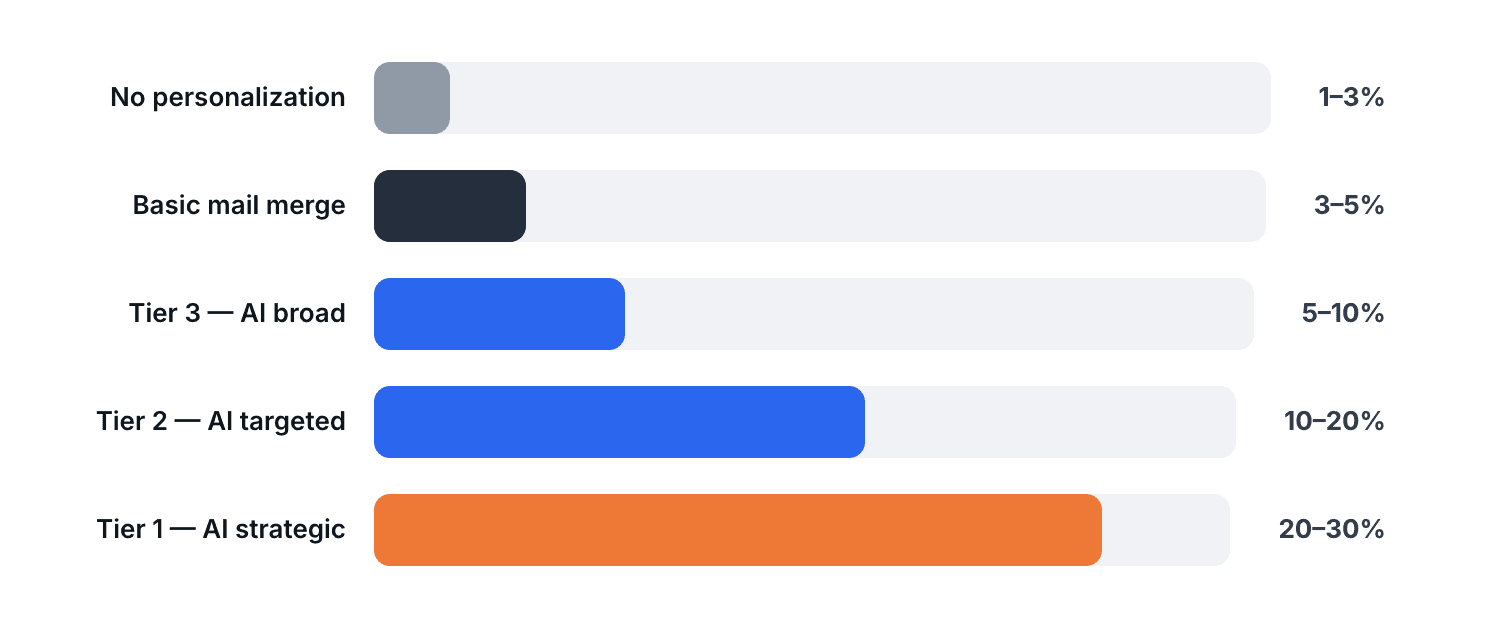
Meanwhile, teams using AI-driven personalization report reply rates between 5% and 35% depending on signal quality and personalization depth. McKinsey's research on personalization at scale consistently shows that companies excelling at personalization generate 40% more revenue from those activities than average players. Experian's email benchmark studies found that personalized subject lines alone increase open rates by 26%.
The math has shifted. Inboxes are noisier than ever — the average B2B buyer receives 120+ emails per day, and AI-generated outreach has made volume even cheaper. The only defensible advantage is relevance: sending hyper-personalized emails that prove you understand the prospect's situation. Generic volume is a race to the spam folder.
How AI Email Personalization Works
The process breaks down into four steps. Understanding them helps you evaluate tools and build the right workflow.
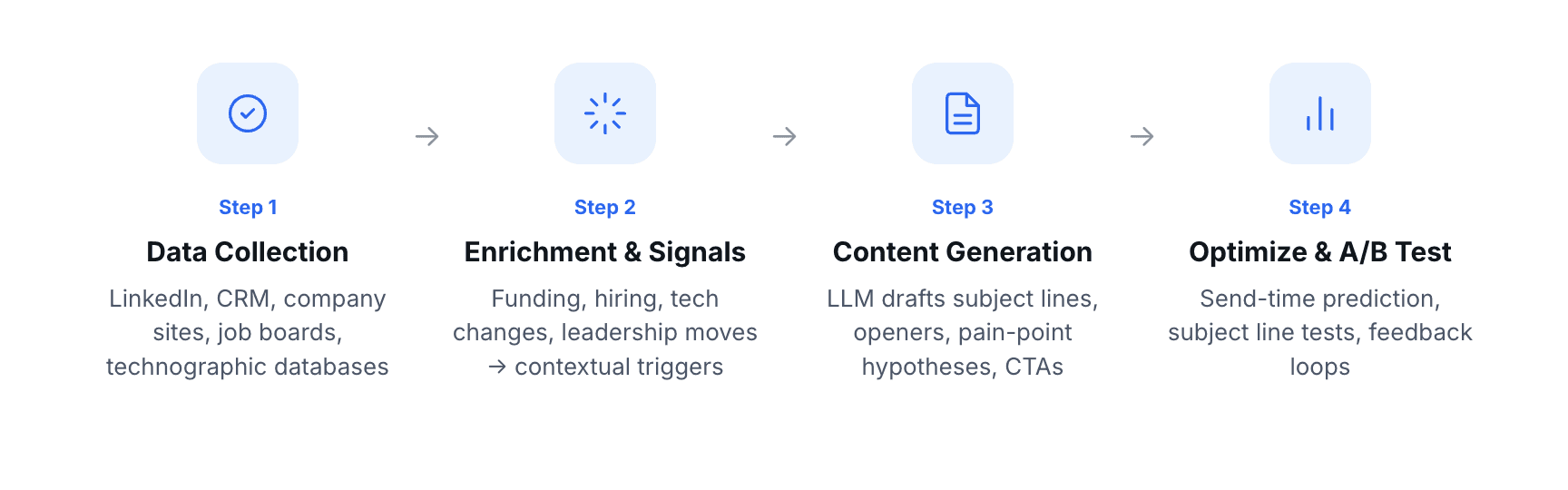
Step 1 — Data collection. The system pulls prospect and company data from multiple data sources: LinkedIn profiles, CRM records, company websites, news feeds, job boards, and technographic databases. The richer the input, the better the output.
Step 2 — Enrichment and signal detection. Raw data is processed into actionable signals. A job posting for "Head of Revenue Operations" isn't just a data point — it's a signal that the company is investing in GTM infrastructure. Funding rounds, leadership changes, product launches, tech stack changes, and hiring patterns all become contextual triggers — what platforms like Topo call intent signals — that give the AI something meaningful to reference.
Step 3 — Content generation. An LLM takes the enriched signals and a prompt template (your messaging framework, value proposition, tone guidelines) and drafts personalized email elements: subject lines, opening lines, pain-point hypotheses, case study references, and CTAs. The best implementations generate chunks — not full emails. The AI writes the personalized opener and the signal-specific pain point; the human-approved sequence handles the structure and CTA.
Step 4 — Send-time optimization and A/B testing. AI analyzes engagement patterns (opens, clicks, reply times) to predict optimal send windows per prospect. Parallel A/B tests on subject lines, openers, and CTAs feed back into the model, improving output quality over time.
The key insight: AI email personalization is a pipeline, not a button. Each step can break — bad data in, irrelevant output out. The teams that win aren't the ones with the fanciest AI; they're the ones with the cleanest data and the tightest feedback loops.
The 3-Tier Personalization Framework
Not every prospect deserves the same level of personalization. Spending 30 minutes researching a Tier 3 account is a waste; sending a template to a Tier 1 account is a missed opportunity. This framework matches personalization depth to prospect value.
Tier 1 — Strategic | Tier 2 — Targeted | Tier 3 — Broad | |
Prospect type | Top 50 dream accounts, enterprise deals, C-suite | ICP-fit accounts with active signals | ICP-fit accounts, no active signals |
Personalization method | Manual research + AI draft, human-edited | AI-drafted with human review | Fully AI-generated |
Time per email | 15–30 min | 3–5 min | < 1 min |
Signals used | Earnings calls, 10-K filings, interviews, LinkedIn activity, mutual connections | Job postings, funding, tech stack changes, company news | Firmographic fit (industry, size, role) |
Expected reply rate | 20–30% | 10–20% | 5–10% |
Volume | 5–10 emails/week | 30–50 emails/week | 200+ emails/week |
Best for | Named accounts, big ACV deals | Mid-market pipeline building | Top-of-funnel awareness, testing new verticals |
How to use this framework. Start by segmenting your prospect list. Assign Tier 1 to accounts where the deal size justifies the time investment — typically 3–5x your average ACV. Tier 2 gets accounts that match your ICP and show at least one buying signal. Everything else is Tier 3.
The framework isn't static. A Tier 3 prospect who opens three emails and visits your pricing page just promoted themselves to Tier 2. A Tier 2 account that announces a funding round moves to Tier 1. Your AI tool should automatically re-tier based on engagement and signal changes.
Before and After Email Examples
This is where theory meets practice. Each example shows a generic cold email next to its AI-personalized version, with the specific signal that powered the personalization.
Example 1 — SaaS selling to a VP Sales
Signal used: Company posted 3 SDR job openings in the past 2 weeks.
Before (generic):
Subject: Quick question about your sales team
Hi Sarah,
I hope this email finds you well. I'm reaching out because we help companies like yours improve their outbound sales process. Our platform uses AI to help sales teams book more meetings.
Would you be open to a 15-minute call to learn more?
After (AI-personalized):
Subject: Scaling from 4 to 7 SDRs without scaling ops?
Hi Sarah,
Saw you're hiring 3 SDRs — going from 4 to 7 is the inflection point where manual list building and enrichment stop working. Most teams at that stage either hire a RevOps person or watch ramp time double.
We help sales teams at that exact stage run outbound without adding ops headcount. Sifflet used us to book Nike, Walmart, and Bose with a 3-person team.
Worth a 15-min look?
Why it works: The subject line references a specific, verifiable situation. The opener demonstrates research without flattery. The pain point (scaling without ops) is inferred from the signal (hiring SDRs), not assumed generically. The social proof is specific and relevant.
Example 2 — Selling data enrichment to a RevOps lead
Signal used: Prospect's company recently adopted HubSpot (technographic change detected).
Before (generic):
Subject: Better data for your CRM
Hi Marcus,
We help RevOps teams keep their CRM data clean and accurate. Our enrichment tool integrates with all major CRMs
Want to see a demo?
After (AI-personalized):
Subject: HubSpot data quality before it becomes a problem
Hi Marcus,
Migrating to HubSpot is the easy part — keeping contact and company data clean after month 3 is where most RevOps teams hit the wall. Especially when SDRs are importing leads from five different sources
We waterfall-enrich across 15+ providers and write directly into HubSpot so your team never exports a CSV. LinkUp used this setup to book 68 meetings in their first quarter
Open to a quick look at how the enrichment workflow maps to your HubSpot instance?
Why it works: The signal (HubSpot adoption) is specific and timely. The pain point (data decay after month 3) shows domain expertise, not just product knowledge. The CTA is contextual — referencing their specific CRM, not a generic "demo."
Example 3 — Selling to a founder at a Series A startup
Signal used: Company announced a $12M Series A two weeks ago.
Before (generic):
Subject: Congrats on the funding!
Hi Alex,
Congratulations on your recent funding round! I'm sure you're busy scaling. We help fast-growing startups with their outbound.
Let me know if you'd like to chat.
After (AI-personalized):
Subject: Post-Series A outbound without hiring an agency
Hi Alex,
$12M Series A means board pressure to show pipeline within 90 days. Most founders at this stage either hire an outbound agency ($8-15K/mo) or ask their first AE to figure it out alone
Third option: an AI sales agent handles list building, enrichment, and sequencing while your AE focuses on running demos. Cabinet replaced their outbound agency entirely with this approach.
Worth a 15-min look before you commit to an agency contract?
Why it works: "Congrats on the funding" is the most overused cold email opener in B2B. The AI-personalized version skips the congratulations and goes straight to the business implication of the signal — board pressure and the agency vs. in-house decision. The CTA creates urgency tied to a real decision the prospect is likely facing.
Example 4 — Multi-threading into an existing account
Signal used: A second stakeholder (CFO) viewed the pricing page after the initial contact (VP Sales) went cold.
Before (generic):
Subject: Following up
Hi Jordan,
I wanted to follow up on my previous email. I think our solution could really help your team.
Do you have time for a quick call this week?
After (AI-personalized):
Subject: Your CFO was on our pricing page yesterday
Hi Jordan,
Looks like someone on the finance side is evaluating — we see that pattern when outbound spend is up for budget review. Happy to send a one-pager with the ROI breakdown so you both have the same context.
Want me to send it over, or would a 10-min call with both of you be faster?
Why it works: The intent signal (pricing page visit by a different stakeholder) is used to re-engage a cold thread with a new angle. The CTA offers two paths — low-commitment (send a doc) and high-commitment (joint call) — respecting the buyer's process.
What to Personalize — and What Not To
Personalize these elements:
The subject line is where personalization has the highest ROI. A subject line that references a specific signal (hiring, funding, tech change) earns the open. The opening line should prove you've done research — reference a specific initiative, metric, or event. Never open with "I hope this finds you well" or "I came across your profile." The pain-point hypothesis should be inferred from signals, not assumed from the prospect's job title alone. A VP Sales at a 10-person startup has different problems than a VP Sales at a 500-person enterprise. And social proof should match the prospect's profile — same industry, similar company size, comparable challenge.
Don't personalize these elements (or be careful):
Overly personal references are creepy, not clever. "I saw you went to Michigan State and your daughter just started soccer" is a restraining order, not a cold email. Irrelevant social activity like commenting on a prospect's vacation photos or personal LinkedIn posts to "build rapport" backfires. The CTA structure should stay consistent across your sequences for measurement purposes — personalize the framing, not the ask. And AI-hallucinated details are the fastest way to destroy credibility. If the AI references an initiative the company isn't actually pursuing, you've lost the deal before the first call. Always verify high-stakes personalization claims.
Best AI Email Personalization Tools (2026)
Every tool listed here is evaluated from the perspective of an outbound sales team. We excluded marketing automation platforms (Mailchimp, HubSpot Marketing) and newsletter tools.
Tool | Type | Personalization depth | Channels | Pricing | Best for |
Clay | Enrichment + signals | Deep (75+ data sources, custom workflows) | Feeds other tools | From $149/mo | RevOps teams wanting max data flexibility |
Smartwriter | AI copy generation | Medium (LinkedIn + company scraping) | From $49/mo | Quick AI-generated personalized lines | |
Instantly | Cold email at scale | Medium (built-in lead database + warmup) | From $30/mo | High-volume cold email + deliverability | |
Lemlist | Multichannel sequences | Medium (LinkedIn + email personalization) | Email, LinkedIn | From $89/mo | Easy email + LinkedIn sequences |
Saleshandy | Cold email + tracking | Medium (mail merge + AI writing) | From $25/mo | Budget-conscious teams scaling email | |
Artisan (Ava) | Autonomous AI SDR | Deep (300M+ contacts, personalization waterfall) | Email, LinkedIn | Contact sales | Fully automated end-to-end outbound |
AiSDR | AI SDR | Medium-deep (HubSpot-native, intent signals) | Email, LinkedIn | From ~$750/mo | Teams wanting AI outbound |
Topo | All-in-one + AI agents | Deep (waterfall enrichment, intent signals, multichannel) | Email, LinkedIn | Small sales teams without any dedicated ops |
How to read this table. "Personalization depth" isn't just about AI writing quality — it's about the richness of the data feeding the AI. Clay offers the deepest customization but requires RevOps talent to configure. Autonomous AI SDRs (Artisan, AiSDR) handle the full loop but trade human control for automation. All-in-one platforms (Topo) bundle data, enrichment, signals, and sequencing so the AI has everything it needs without stitching tools together.
The tool choice depends on your team structure. If you have a RevOps person, Clay as the enrichment layer feeding Instantly or Lemlist gives maximum flexibility. If you don't have ops support, an all-in-one platform eliminates the integration tax. If you want to fully delegate outbound to AI, an autonomous AI SDR is the bet — but review the output quality carefully before scaling. For a deeper comparison of the full outbound stack, see our best AI outbound prospecting tools breakdown.
How to Implement Step by Step
Step 1 — Define your ICP with signal criteria
Go beyond firmographics (industry, size, revenue). Define the signals that indicate buying intent: hiring for specific roles, adopting complementary tech, announcing funding, opening new markets. These signals power your personalization.
Step 2 — Connect your data sources
Integrate your CRM, enrichment providers, and signal sources into a single workflow. The goal is a unified prospect record that the AI can read: company data + contact data + contact information + contextual signals. Gaps in any layer weaken the personalization output.
Step 3 — Set personalization rules by tier
Map your 3-tier framework to your tools. Tier 1 accounts get manual research plus AI-assisted drafting with human editing. Tier 2 gets AI-drafted emails with a human review queue. Tier 3 runs fully automated with spot-check QA. Set these rules in your multichannel sequence tool so reps know exactly what's expected at each tier.
Step 4 — Review AI outputs before scaling
Run 50 emails at each tier before scaling. Check for hallucinated company details, off-brand tone, and generic filler that the AI defaults to when signal data is thin. Fix your prompts and data inputs based on what you find. This calibration phase is non-negotiable — skipping it is how teams end up sending "I noticed your company is doing great things" to 5,000 prospects.
Step 5 — Measure and iterate
Track reply rates, positive reply rates, and meetings booked per tier. If Tier 3 is converting at 2% instead of 5%, the signals feeding the AI are probably too thin — add more data sources or tighten your ICP filter. If Tier 1 isn't hitting 20%+, the research depth or messaging framework needs work. Run A/B tests on subject lines and openers at each tier. Iterate in two-week sprints.